How to Showcase Your Accomplishments Using the LinkedIn “Featured Section”
Why is it Important to Showcase Your Accomplishments?
When you're part of online professional networks like LinkedIn, it's a good idea to share your successes.
This isn't about bragging, it's about showing who you are.
When you highlight things you've done well, like
Finishing a project
Winning an award
Speaking at an Event, etc.
It helps others see how skilled and dedicated you are. Sharing your achievements on your profile helps you make connections 🤝🏼 and might lead to new opportunities 🎯. It's like telling a story about what you're good at, and it can help you meet new people and do even more cool stuff 😎 in your career!
Using LinkedIn “Featured Section” to Showcase Your Accomplishments
Watch the video or read below, on how you can use the LinkedIn “Featured Section” to Showcase Your Accomplishments.
Guide on How to Feature a Post on LinkedIn
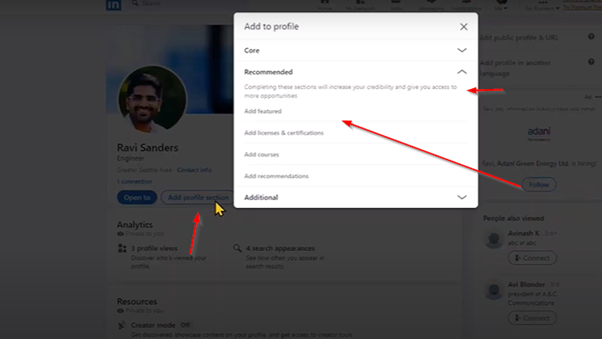
Step 1: Add the Featured Section to Your Profile
Go to your LinkedIn profile.
Click Add profile section.
Under Recommended, choose Featured.
This creates a new “Featured” section on your profile (if you don’t already have one).
Step 2: Copy the Link to Your Post
Open the LinkedIn post you want to feature.
In the top right of the post, click the three dots (…).
Select Copy link to post.
Step 3: Add the Post to the Featured Section
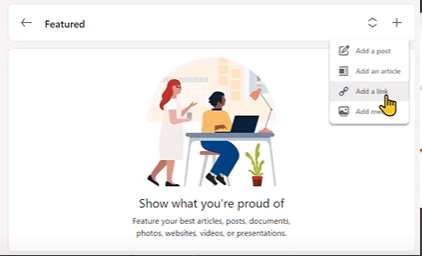
Go back to your profile, scroll to the Featured section, and click + (Add).
Select Add a link (not “Add a post”).
Paste the link to your post.
Click Add.
Step 4: Clean Up the Preview
LinkedIn will generate a preview card for your post.
Shorten or adjust the Title if needed.
Leave the Description blank (this keeps the card clean).
Save.
Step 5: Reorder Your Featured Items
In the Featured section, click the pencil icon ✏️ to edit.
Choose Reorder.
Drag and drop your items into the order you prefer (important posts at the top).
Save.
Step 6: Check and Maintain
View your profile to confirm the featured post looks good.
To update later: remove or reorder items anytime.
In this day and age, you can’t just do good work and hope to succeed 🤞. You need to do the good work, but then also share the story of your work with the world 🌍.
And now you can do that easily using the LinkedIn Featured Section.
